
Connect the pieces so your business can move with less manual effort.
AI, automation, and integrations work best when they solve real workflow problems. We help connect tools so leads, follow-up, reporting, and internal processes move more smoothly without forcing your team to copy, paste, chase, and repeat the same steps.
The goal is to make the right information easier to capture, route, understand, and act on so your team can move faster with better context.
Assistants & Knowledgebases
Connections & Lead Routing
Smarter Reporting
Workflow Support
Most automation starts with a tool. We start with the workflow that needs to become easier.
The best automation does not add complexity. It removes friction. Before recommending a bot, CRM connection, dashboard, or follow-up sequence, we look at where information gets lost, where your team repeats work, and where prospects need a clearer path.

Capture Better Information
Forms, bots, landing pages, and tools should collect the details your team needs to follow up well.

Route the Right Lead
Good automation helps the right person or system see the lead with enough context to act.

Make Activity Visible
Dashboards and reporting should help you understand activity without digging through disconnected tools.

Improve Follow-Up
Automated reminders, alerts, emails, and internal workflows can help prevent good opportunities from going quiet.
Leads, tools, teams, and reporting should not feel like separate islands.
Your website, forms, chatbot, CRM, email tools, ad platforms, dashboards, and follow-up systems can all work better when the right pieces are connected with a clear purpose.
AI
AI Assistants
Help visitors explore services, ask questions, find resources, and move closer to a real conversation.
Knowledge
Knowledgebases
Organize company-specific information so AI and team resources can answer more accurately.
Forms
Smarter Intake
Capture the right fields, qualify interest, and send details where they need to go.
CRM
CRM Connections
Push leads, form submissions, appointment details, and follow-up context into the right system.
Routing
Lead Routing
Route inquiries by service, location, product, urgency, source, or assigned team member.
Alerts
Team Notifications
Notify the right people when a form, scan, call, booking, or high-intent action happens.
Reporting
Dashboards
Bring key activity into one view so marketing and sales can understand what is happening.
Follow-Up
Automated Follow-Up
Support email reminders, internal tasks, lead nurturing, booking prompts, or next-step sequences.
Sometimes we build it. Sometimes we find it. Always, we make it work.
Not every smart solution needs to be built from scratch. Sometimes the best move is configuring a proven platform. Sometimes it is connecting tools you already use. Sometimes the opportunity calls for a custom AI assistant, dashboard, portal, estimator, or workflow.
1
Build what does not exist
Custom assistants, dashboards, forms, portals, estimators, and workflows can be shaped around your process.
2
Customize what already works
Existing CRMs, automation platforms, form tools, and email systems can often be configured around your needs.
3
Connect the pieces
Forms, websites, CRMs, email tools, ad platforms, analytics, and AI can share more useful information.
4
Keep humans in control
Automation should support the team, not hide important context or replace judgment where it still matters.
A stronger workflow keeps the opportunity moving.
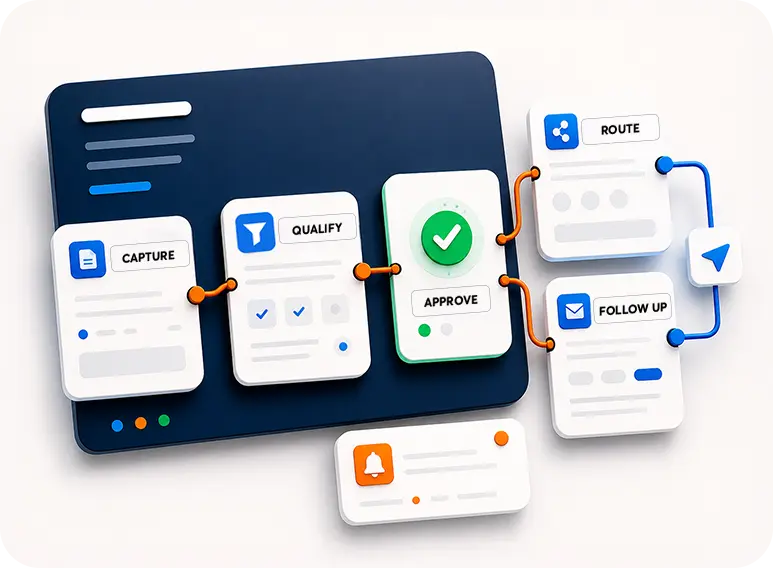
When a lead comes in, the process should not depend on someone noticing an email, copying information into a spreadsheet, manually forwarding a message, or remembering every follow-up step.
Step 1
Capture
A form, chatbot, QR scan, call, tool, or landing page creates the initial signal.
Step 2
Qualify
The system collects service, location, urgency, budget, product, or project context.
Step 3
Route
The lead goes to the right CRM, inbox, team member, pipeline, or follow-up path.
Step 4
Notify
The right people know what happened and why the opportunity may matter.
Step 5
Follow Up
Automated emails, reminders, tasks, or booking prompts help keep the conversation alive.
Step 6
Report
Activity becomes easier to review through dashboards, exports, or campaign reporting.
AI is most useful when it knows your business, not just the internet.
A company-specific AI assistant can help prospects explore services, ask better questions, find resources, and move closer to a real conversation. Internally, AI can also help organize knowledge, answer common questions, and support repeatable workflows.
Public-Facing
Website AI Assistants
Help visitors get answers, find services, and understand how your company can help.
Internal
Team Knowledgebases
Organize FAQs, processes, service information, sales notes, and company-specific guidance.
Sales Support
Guided Conversations
Use AI to help users explore options, compare paths, and get closer to a useful next step.
Lead Capture
Context Collection
Gather useful information before routing the inquiry to a person or system.
Content
Resource Navigation
Help people find pages, services, documents, case studies, or answers more easily.
Escalation
Human Handoff
Make it clear when someone should talk to your team instead of relying on automated answers.
Maintenance
Knowledge Updates
AI tools are stronger when the underlying information is reviewed and improved over time.
Guardrails
Practical Boundaries
Set expectations around what the assistant can answer, what it should avoid, and when to hand off.
Useful automation connects trigger, logic, destination, and follow-up.
Automation is more than a zap or one integration. A reliable workflow needs to know what starts the process, what information matters, where it should go, who should know, and what should happen next.
Trigger
Starting Signal
Form submission, call, booking, QR scan, chatbot conversation, email action, or tool result.
Data
Useful Fields
Capture the information needed for sales, service, reporting, or internal workflow.
Logic
Routing Rules
Route by service, location, team member, campaign, urgency, product, or qualification detail.
CRM
System Updates
Create or update records, deals, contacts, tasks, notes, or pipeline stages.
Alerts
Notifications
Send emails, internal alerts, task reminders, or sales notifications with context.
Follow-Up
Next-Step Sequences
Support email replies, booking prompts, lead nurture, reminders, or internal tasks.
Reporting
Dashboards
Bring important activity into a view that helps people understand what is happening.
Review
Ongoing Improvement
Review workflows as tools change, campaigns evolve, and the business learns what matters.
Small connections can make a big difference in daily workflow.
Sometimes the biggest improvement is a cleaner handoff: the right lead reaches the right person, the team gets alerted faster, the CRM stays organized, and reporting becomes easier to understand. Other projects call for deeper automation or custom logic.
Forms
Smart Lead Forms
Capture better details and send submissions into the right follow-up path.
CRM
CRM Setup Support
Connect leads, forms, notes, tasks, contacts, and pipelines to marketing activity.
Automated Emails
Support confirmation messages, nurture emails, reminders, and internal notifications.
Ads
Lead Routing
Route Google Ads, social ads, landing page forms, and campaign inquiries with context.
Tools
Estimator Follow-Up
Connect calculators, estimators, and quote tools to lead capture and reporting.
Sales
Appointment Workflows
Support booking flows, calendar notifications, reminders, and follow-up tasks.
Reporting
Activity Dashboards
Show leads, sources, forms, calls, scans, or other activity in a more usable way.
AI
Custom AI Assistants
Build public or internal assistants around your services, FAQs, resources, and sales logic.
A practical path from messy workflow to connected system.
We start by understanding how work currently happens, then identify the practical connections, tools, and automation steps that could make the process easier.
01
Map the Workflow
Understand what happens now, where work slows down, and where information gets lost.
02
Choose the Tools
Decide whether to use existing platforms, new tools, custom development, or a combination.
03
Define the Logic
Set the rules for routing, notifications, CRM updates, follow-up, and reporting.
04
Build Connections
Create the integration, automation, AI assistant, dashboard, or workflow support.
05
Test the Flow
Check the data, destinations, notifications, user experience, and edge cases.
06
Improve Over Time
Refine workflows as tools, campaigns, sales processes, and business needs evolve.
We understand the marketing side and the technical side.
Automations are most useful when they support the business goal. Because Top Jump works across websites, ads, SEO, direct mail, AI, custom tools, and CRM workflows, we can think through both the marketing strategy and the operational handoff.
Strategy First
Automation shaped around what the business needs to accomplish.
Connected Thinking
Lead capture, follow-up, reporting, and workflows considered together.
Practical Tech
Custom builds, existing platforms, and integrations chosen based on fit.
Automation decisions are easier when expectations are clear.
These quick answers help explain AI assistants, integrations, CRMs, dashboards, maintenance, privacy, and realistic expectations.
Can AI replace talking to a real person?
No. AI can help answer questions, guide exploration, collect context, and support workflows, but it should not replace real strategy conversations, human judgment, or important relationship moments.
Can you connect any tool to any other tool?
Not always. Integrations depend on each tool’s API, permissions, account level, data structure, security rules, and platform limitations. We review what is possible before recommending the best path.
Can you work with our existing CRM?
Often, yes. We can review your CRM and related tools to determine whether leads, forms, alerts, reporting, tasks, or follow-up can be connected or improved.
Do AI assistants require ongoing maintenance?
Yes. AI assistants and knowledgebases are strongest when the underlying information is reviewed, updated, and improved as the company, services, policies, and content change.
Can automation help with reporting?
Yes. Dashboards and reporting workflows can help bring leads, calls, forms, scans, campaign activity, and other signals into a more useful view.
What about privacy and sensitive data?
Privacy, access, permissions, data handling, and platform rules should be considered before connecting systems or using AI. We help think through practical boundaries and recommend responsible workflows.
Want to explore automation ideas first?
Use the green “Ask me Anything” button in the corner to get campaign ideas, strategy guidance or answers about our business instantly. Our AI assistant is not a replacement for a real strategy conversation, but it might surprise you.