
Build digital tools your current website or software cannot handle.
Sometimes your business needs more than a standard page, plugin, or form. We help create estimators, product customizers, portals, quote tools, dashboards, calculators, and workflows that solve real problems for internal teams, affiliates, contractors, customers, and prospects.
The goal is to give people value upfront, simplify complex decisions, organize important resources, or make internal work easier to manage.
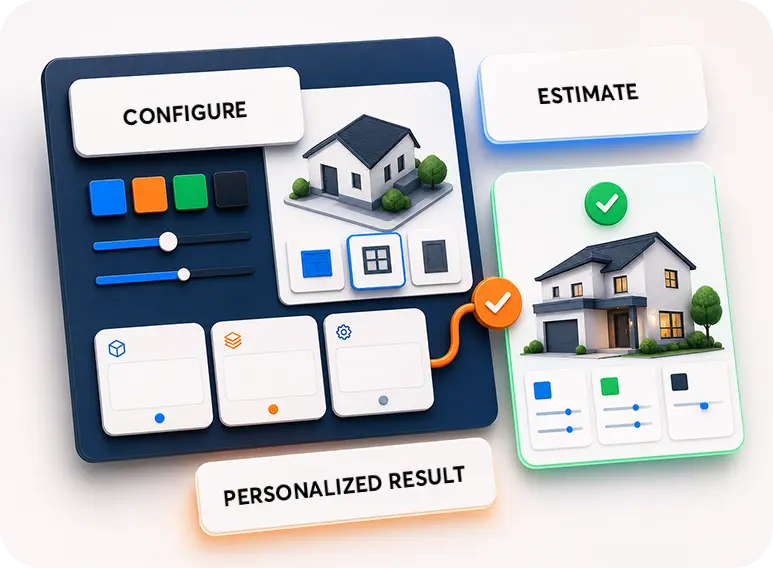
Estimators & Calculators
Product Customizers
Portals & Resource Hubs
Dashboards & Workflows
Most custom development starts with features. We start with the problem the tool needs to solve.
A custom tool should make something easier, clearer, faster, more useful, or more measurable. Before building, we think through who will use it, what they need, what decisions it supports, what data matters, and how the tool fits into your larger business.

Give Value Upfront
Estimators and calculators can help prospects understand cost, savings, options, or next steps before contacting you.

Make Choices Visual
Product customizers help users explore colors, features, packages, and options in a more engaging way.
Organize Resources
Portals can make materials easier to access for employees, contractors, affiliates, manufacturers, or customers.
Support Workflows
Dashboards, quote tools, and internal systems can help teams see, route, and act on information more clearly.
Custom tools can support sales, service, education, operations, and lead generation.
The best tool depends on who needs it and what it needs to accomplish. It may help a prospect make a decision, help a customer access resources, help an affiliate stay informed, or help an internal team manage work.
Estimators
Cost Estimators
Give users a ballpark range, project expectation, or starting point before the sales conversation.
Savings
Energy Savings Tools
Help users understand potential savings, performance improvements, or cost-of-waiting scenarios.
Visual
Product Customizers
Let users explore roof colors, trim colors, main paint colors, features, or package combinations.
Portals
Resource Hubs
Organize resources for employees, contractors, dealers, affiliates, customers, or manufacturer partners.
Sales
Quote Tools
Guide users or internal teams through structured quote requests, intake, or pricing logic.
Reporting
Dashboards
Bring important activity, submissions, results, leads, or operational signals into a clearer view.
Calculators
Decision Tools
Help users compare options, estimate outcomes, understand tradeoffs, or plan next steps.
Internal
Team Tools
Create internal workflows, content libraries, intake systems, approval flows, or operational helpers.
Let people see the choice before they ask for the quote.
A product customizer can turn a complex set of options into something visual and fun to explore. For example, a shed buyer might try different roof colors, trim colors, main paint colors, doors, windows, and features before contacting your team.
1
Visual buying experiences
Help users understand color, style, feature, or package combinations without needing a salesperson first.
2
Better sales conversations
When prospects explore options first, your team can start with more context and better questions.
3
More qualified interest
Interactive tools can help reveal what someone wants, what they are considering, and how serious they may be.
4
Memorable brand experience
A useful customizer can make your website feel more helpful, more modern, and harder to forget.
Give people something useful before asking them to call.
Estimators can help users understand potential savings, ballpark pricing, project scope, cost ranges, timeline expectations, or planning factors. The tool gives value upfront while helping you capture more informed leads.
1
Energy savings estimates
Show potential savings, efficiency value, or what a current condition may be costing over time.
2
Ballpark cost estimates
Give prospects a realistic starting range before they request a formal quote or inspection.
3
Planning calculators
Help users compare options, size a project, understand materials, or prepare for the next step.
4
Lead capture with context
Estimator results can connect to forms, notifications, CRMs, dashboards, or follow-up workflows.
Sometimes the best tool is a place where the right people can find the right resources.
Portals can serve internal teams, affiliates, contractors, customers, dealers, manufacturer partners, or any group that needs organized access to documents, tools, downloads, updates, training, forms, or project information.
Employees
Internal Resources
Organize policies, training materials, forms, process documents, links, and team resources.
Contractors
Contractor Portals
Provide documents, downloads, product information, training, tools, and support materials.
Manufacturers
Partner Resources
Give manufacturer partners, reps, or dealers easier access to branded materials and technical resources.
Customers
Customer Access
Share project resources, account materials, downloads, updates, or next-step instructions.
Affiliates
Affiliate Tools
Support affiliates with links, tracking resources, campaign materials, or program details.
Sales
Sales Libraries
Organize sell sheets, proposals, pitch materials, pricing aids, and presentation support.
Downloads
Resource Downloads
Provide PDFs, images, logos, brochures, guides, forms, or packaged files.
Access
Gated Information
Limit sensitive materials to approved users, team members, or trade partners when needed.
We want you to own what we build to the greatest extent possible.
Custom development should not leave you trapped. When possible, we build in ways that can be accessed, documented, and handed off. At the same time, some projects require third-party tools, APIs, plugins, hosting, software, or services because rebuilding those systems from scratch would be unnecessarily expensive.
1
Open where possible
We aim to avoid unnecessary lock-in and keep the work accessible when the project allows it.
2
Third-party tools can be necessary
Specialized tools may create dependencies, but they can also save significant cost and time.
3
Handoff should be possible
Where practical, we structure work so another qualified developer can take over if the situation warrants.
4
Maintenance matters
Tools, integrations, APIs, plugins, and security requirements can change, so ongoing care may be necessary.
Useful tools connect user needs, business logic, data, and follow-up.
Custom tools work best when they are designed around a real process. The interface is only one part. The logic, data, ownership, maintenance, integrations, and user experience all matter.
User
Audience Need
Clarify whether the tool is for prospects, customers, employees, contractors, affiliates, or partners.
Purpose
Business Problem
Define what the tool should simplify, calculate, organize, display, route, or capture.
Logic
Rules & Calculations
Map formulas, options, conditions, pricing rules, recommendations, or decision paths.
Interface
User Experience
Make the tool feel simple from start to finish. Visitors should understand what it does and how to use it.
Data
Lead Capture
Collect useful information and connect results to forms, CRMs, notifications, or reporting.
Integration
Connected Systems
Connect with third-party tools, APIs, CRMs, email systems, dashboards, or databases when needed.
Ownership
Accessible Build
Build in a way that supports long-term access and future developer handoff where possible.
Maintenance
Long-Term Health
Plan for updates, security, compatibility, API changes, and future improvements.
A practical path from idea to working tool.
Custom tool projects start with clarity. We work through the problem, audience, workflow, data, integrations, interface, and long-term support before treating the project like a development task.
01
Define the Problem
Clarify what the current website, software, or workflow cannot do well enough.
02
Map the Users
Understand who will use the tool and what they need to accomplish.
03
Plan the Logic
Document calculations, decisions, data, user paths, forms, and outputs.
04
Choose the Path
Decide whether to custom build, customize an existing solution, or connect third-party tools.
05
Develop & Test
Build the tool, test the experience, check edge cases, and review data flow.
06
Launch & Maintain
Deploy the tool and plan for future updates, improvements, security, and compatibility.
A useful tool can serve more than just website visitors.
Custom tools can help prospects, customers, sales teams, employees, affiliates, contractors, dealers, manufacturers, and internal leadership. The key is building around the real audience and the action you want to make easier.
Prospects
Lead Generation Tools
Estimators, configurators, calculators, quote flows, and planning tools that create qualified interest.
Customers
Customer Tools
Portals, project information, downloads, support flows, and account-related experiences.
Teams
Internal Tools
Dashboards, intake systems, resource hubs, approval flows, and operational helpers.
Sales
Quote Support
Tools that help sales teams estimate, recommend, present, and follow up more consistently.
Contractors
Contractor Resources
Access to product information, technical documents, branded resources, training, and downloads.
Affiliates
Affiliate Support
Campaign resources, tracking links, program details, creative materials, and reporting helpers.
Manufacturers
Partner Portals
Resource access for reps, dealers, distributors, or trade partners who need organized materials.
Leadership
Decision Dashboards
Higher-level views of activity, lead sources, tool usage, submissions, and operational signals.
We think like marketers, builders, and business operators.
Because Top Jump works across websites, ads, SEO, AI, automation, direct mail, print, and custom development, we can help shape tools that support both the user experience and the business workflow behind it.
Custom tools are most valuable when they make the business easier to explain, sell, manage, or measure.
Strategy First
Tools shaped around business problems, not just technical features.
Full-Service Application
Development connected to marketing, lead capture, reporting, and follow-up.
Ownership-Minded
Practical builds that consider access, handoff, documentation, and long-term maintenance.
Custom tool decisions are easier when expectations are clear.
These quick answers help explain ownership, third-party dependencies, maintenance, handoff, security, and the long-term realities of custom tools.
Will we own the custom tool?
We aim to let you own what we build to the greatest extent possible. Exact ownership depends on the project scope, platform, third-party tools, licenses, APIs, hosting, and any specialized services required.
Will third-party tools create dependencies?
Often, yes. Third-party tools, APIs, plugins, CRMs, hosting platforms, and specialized services can create dependencies, but they often save significant cost compared to rebuilding everything from scratch.
Can another developer take over later?
Where possible, we try to structure work so another qualified developer can access, review, and take over the project if the situation warrants. Some third-party tools may still require account access, licenses, or platform-specific knowledge.
Do custom tools need maintenance?
Often, yes. Tools can become outdated or insecure as browsers, plugins, APIs, hosting environments, software libraries, and security requirements change. Ongoing maintenance may be necessary to keep the tool working safely.
Can you build a product customizer?
Yes. A product customizer could allow users to explore options such as roof colors, trim colors, paint colors, features, packages, or configurations depending on the product and available visual assets.
Can estimators provide exact pricing?
They can, but many are better as ballpark estimators unless pricing rules, materials, labor, taxes, location variables, and scope details are precise enough to support exact calculations.
Can portals be private or password protected?
Yes. Portals and resource hubs can be public, gated, password protected, role-based, or connected to user accounts depending on the level of access control needed.
How do we know whether to build custom or use an existing tool?
We compare the business need, budget, timeline, ownership goals, integration requirements, long-term maintenance, and available third-party options before recommending the best path.
Not sure which service you need?
Use the green “Ask me Anything” button in the corner to get campaign ideas, strategy guidance or answers about our business instantly. Our AI assistant is not a replacement for a real strategy conversation, but it might surprise you.